

Quick Start: Do This on Your Store
If you came for the steps, here they are. The whole setup is a proxied CNAME in Cloudflare, the same domain connected in Shopify, and one HTTPS toggle left alone. The rest of this article explains why each step matters and how to confirm it held, but this is the entire configuration.
Prefer to watch: Field Notes: Cloudflare in front of Shopify covers the same ground in three minutes, with a full transcript on the page.
Add the proxied CNAME in Cloudflare
In the Cloudflare dashboard, open DNS → Records and click Add record. Create a CNAME for your root domain and one for www, both pointing at shops.myshopify.com, with Proxy status set to Proxied so the cloud turns orange. When Cloudflare recognizes the target, a small Shopify icon appears next to the record: that icon is Orange-to-Orange engaging.
Connect the same domain in Shopify
In Shopify admin, go to Settings → Domains, choose Connect existing domain, and enter that domain. Shopify checks the DNS record and marks the domain Connected. It may still surface the Cloudflare-proxy warning; that is expected, and the sections below explain why it is not the alarm it looks like.
Leave one HTTPS setting alone
Back in Cloudflare under SSL/TLS, confirm the encryption mode is Full and leave Always Use HTTPS off. Shopify already upgrades HTTP to HTTPS at its origin, and that single toggle is the one thing most likely to break the setup. Everything else can stay at its default.
Step 1 in the Cloudflare dashboard: both records are CNAMEs to shops.myshopify.com with Proxy status Proxied.
shops.myshopify.com
Proxied
Auto
shops.myshopify.com
Proxied
Auto
The clawmart.digital values shown throughout this article are from a live test store we run on a fully functional Shopify instance, not a mockup. Every screenshot, record, and test below comes from that store.
The Warning on a Working Store
Your Shopify domain shows as connected, the checkout works, and the SSL padlock is in place. Directly beneath that green status sits an amber warning that your domain has a Cloudflare proxy, which Shopify does not support. Both are true at the same time, and that contradiction is where most merchants get stuck.
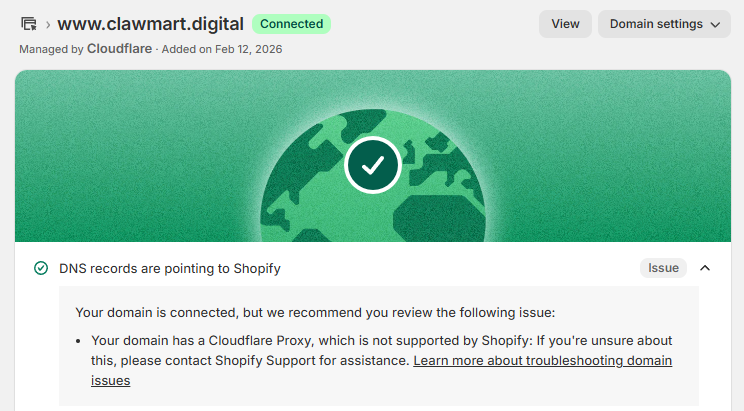
This is one of the most confusing messages in ecommerce infrastructure, because it is not wrong and it is not quite right either. For years, putting Cloudflare in front of Shopify was a genuinely bad idea that broke stores in a specific, predictable way. Then Cloudflare shipped a routing feature that fixed the exact thing that broke, and yet Shopify still tells you not to do it. That gap, between a fix that works and a vendor that will not endorse it, is where the "is my store about to break" worry lives.
So this is the practical version: what actually broke, what O2O fixed, the one setting that will still take your site down if you miss it, and how to decide whether any of this belongs on your store.
Why It Used to Break: Two Orange Clouds
Cloudflare shows a proxied domain as an orange cloud. Traffic to that domain runs through Cloudflare's network before it reaches your origin. The catch on Shopify is that Shopify itself runs on Cloudflare. So when you point your orange-clouded domain at Shopify, the request arrives at Cloudflare with two zones that both claim it: yours, and Shopify's. Two orange clouds, stacked.
Historically, Cloudflare could not reliably tell which zone should own that request, so it would resolve to the wrong place or loop. The result was a store that half worked and failed in ways that were hard to reproduce.
The sharpest edge was SSL. Shopify provisions and renews your certificate through Let's Encrypt, and Let's Encrypt proves you own the domain with an ACME challenge served at a specific path:
/.well-known/acme-challenge/If a proxy in front of Shopify intercepts, caches, or redirects that path, the challenge never completes. No completed challenge means no certificate. And because certificates renew on a schedule, this often failed silently: the store worked fine on the existing certificate for weeks, then went insecure the day it lapsed. This is why the old advice was one blunt line, turn the cloud grey, DNS only, get Cloudflare's proxy out of the path.
What Orange-to-Orange Changed
Orange-to-Orange, or O2O, is Cloudflare's answer to the two-zones problem, and it is part of a product called Cloudflare for SaaS. Cloudflare opened that product to every customer in 2021, generally available that October, so O2O is a settled routing path with years behind it, not a recent experiment. The mechanism is straightforward: when your proxied zone points a CNAME at a service that is also a Cloudflare for SaaS customer, Cloudflare recognizes the target and stops treating the two zones as a collision. It routes the request through your zone first and the provider's zone second, in a defined order, and the double proxy becomes a handoff.
Two zones claim the same request. Routing is ambiguous, the ACME challenge gets caught in the middle, and certificates fail.
One ordered path. Your edge rules run first, Shopify serves second, and the challenge reaches Shopify intact.
You do not have to take it on faith that O2O engaged. Create the CNAME with the proxy on, and Cloudflare puts a small Shopify icon next to the record. That icon is the detection confirming it knows where the traffic is going. Cloudflare also does provider-specific housekeeping in the background, including disabling Workers and Snippets on the /checkout path, so nothing you run at the edge can interfere with payment.
shops.myshopify.com
Proxied
Auto
shops.myshopify.com
Proxied
Auto
You add that record in the Cloudflare dashboard under DNS, then Records. Click Add record, set the Type to CNAME, the Target to shops.myshopify.com, and the Proxy status to Proxied so the cloud turns orange. The Shopify icon appears next to the record once Cloudflare recognizes the target as one of its own SaaS customers.
Handling the One Exception: SSL
O2O fixed the routing collision. It did not fix SSL, because SSL was never really a routing problem. It was a proxy touching the one path Shopify uses to renew certificates. On a correctly set up store almost all of this now runs on its own, so the useful thing is to know what is automatic, then check the short list that is not.
What happens automatically now
Your store carries two certificates, and both renew without you. Because the domain is proxied, the certificate visitors see is Cloudflare's own edge certificate, which Cloudflare validates over DNS and renews on its own, so the ACME path never touches it. Behind it, Shopify keeps a separate origin certificate for the Cloudflare-to-Shopify leg, renewed through Let's Encrypt, and your Full encryption mode is built to trust it. Shopify also runs the HTTP to HTTPS upgrade at its own origin, so visitors land on a secure connection whether or not Cloudflare lifts a finger.
/.well-known/acme-challenge/That origin certificate renews through ACME, the automated exchange Let's Encrypt uses to confirm you control the domain. It asks whatever answers for your domain to serve a one-time token at the path above, over plain HTTP, and Shopify handles the whole exchange in the background. That is why you never think about it. The setup stays healthy for exactly as long as that one path stays reachable.
The one thing that breaks it
All of that automatic renewal rests on one Cloudflare setting staying off, and it is switched on in plenty of setups by default.
So the fix is mostly a matter of not turning that toggle on, and letting Shopify's origin redirect do the upgrade it already performs. If you want Cloudflare to enforce HTTPS at its own edge as well, use a redirect rule that skips the challenge path, never Always Use HTTPS.
/.well-known/acme-challenge/*What to spot-check
Everything below lives in the Cloudflare dashboard. Sign in at dash.cloudflare.com, choose your account, and click the domain to open its zone. Each item is a path in that zone's left-hand sidebar.
Confirm the encryption mode reads Full. To change it, use the Configure button on that page. Full encrypts the whole path to Shopify without demanding an origin certificate Cloudflare has to validate; Flexible would send plain HTTP to the origin and break the padlock. Set the mode by hand rather than leaving Automatic SSL/TLS on: pinning it to Full keeps Cloudflare from re-probing the origin and shifting you to Full (strict) on its own, and on an unsupported setup a fixed mode is one less variable.
Scroll down to the Always Use HTTPS card and leave its toggle off. Turned on, it collides with Shopify's origin redirect and blocks the challenge path.
On the same page, set Minimum TLS Version to TLS 1.2. The default of TLS 1.0 still accepts obsolete, insecure connections, and PCI guidance for a store that takes payments is 1.2 or higher. Every real browser supports it, so the only thing you drop is ancient bots.
Only if you want Cloudflare to force HTTPS at its edge instead of relying on Shopify's origin redirect. Choose Create rule, then redirect to HTTPS when the URI path does not start with /.well-known/acme-challenge/.
One neighbor on that Edge Certificates page trips people up: Automatic HTTPS Rewrites is safe to leave on. It only rewrites http resource links to https to prevent mixed-content warnings, which is nothing like Always Use HTTPS forcing a full-page redirect. Opportunistic Encryption and TLS 1.3 can stay on too. Always Use HTTPS is the only toggle on that screen that needs to stay off.
Then confirm it from the outside, without waiting for a renewal to fail. Request the challenge path over plain HTTP and read the response:
curl -sI http://clawmart.digital/.well-known/acme-challenge/test
Reaching Shopify is the win, and a 404 for the made-up token is exactly right. A 301 or 308 redirect to HTTPS means Always Use HTTPS or a catch-all rule is still swallowing the path. After that, check the SSL status under Settings → Domains in your Shopify admin, and over the following weeks watch the origin certificate's expiry date move forward on its own. A certificate that renews untouched is the signal the setup is holding.
Run that test again after any change to your DNS or Cloudflare settings, not only at setup. Shopify Community user Hardeep raised this in the thread on this article, and it matches how these setups actually fail. The configuration was right on day one, someone edited a rule or a record months later, and nobody re-checked the challenge path until a certificate quietly did not renew.
One trap is worth naming plainly: a certificate showing as provisioned today tells you the current one issued, not that the next renewal will. Let's Encrypt certificates renew on a roughly sixty to ninety day cycle, so a store that looks completely healthy may just be one that has not reached its renewal date yet. That, plus the fact that many stores never turned Always Use HTTPS on to begin with, is why plenty run this for months without a hitch, and why the failure, when it comes, is confusing. Nothing changed, except a certificate that quietly did not renew.
Give it the right weight. This is cheap insurance against an uncommon but silent failure, not a sign your store is about to break. Do the two-minute configuration, run the test, and you have closed the one renewal-time gap that is genuinely hard to notice.
Shopify Still Will Not Sign Off On This, Because…
Shopify's documentation does not hand-wave about "proxies" in general anymore. It names O2O directly:
"Cloudflare proxy setups, including O2O, aren't supported by Shopify. Although your store might appear to function correctly, this setup could break at any time."
That is not an outdated warning about a solved problem. It is a current, deliberate position, and two of the reasons behind it hold up even after O2O:
Even configured correctly, a proxy is one more thing sitting between Shopify and Let's Encrypt. Correct today does not mean immune to a future change on either side.
When Shopify's own infrastructure has a problem, extra proxies in front of your store make it harder for Shopify to reroute around it. The proxy can raise your outage exposure, not lower it.
Shopify's own documentation adds a third reason, bot detection, arguing that traffic through Cloudflare reaches it with altered request attributes. In practice that is the weakest of the three: Cloudflare runs one of the largest bot-management networks there is, so most stores gain far more bot filtering at the edge than Shopify loses in signal. It is the one item on Shopify's list where the proxy is more likely to help than hurt.
Is the Warning Heavy-Handed?
A little, and understandably. The dashboard flags a working, connected store with an amber "Issue" and the flat phrase "not supported," which lands heavier than the real failure modes, most of which are avoidable with correct configuration. A merchant reads "Issue" and hears "your store is about to break," when what Shopify means is closer to "we will not vouch for this."
But "not supported" is not "does not work," and the distinction matters. It means Shopify will not guarantee, debug, or take responsibility for behavior in a layer they do not control. For a platform that owns your checkout and your uptime, that is a reasonable line to draw, even if the banner draws it bluntly. The flag tells you Shopify will not stand behind the setup. It does not tell you the setup is failing.
There Are Many Shopify Stores Running This
You do not have to take one test store's word for it. A Cloudflare proxy in front of Shopify is not a fringe configuration: plenty of established brands run it in production, every day. The names below are live examples we verified by hand, each one currently serving its storefront through a Cloudflare proxy with Shopify behind it.
Verified in July 2026 by requesting each domain and confirming a Cloudflare proxy response together with Shopify storefront markers. A store's setup can change at any time, so treat this as a snapshot, not an endorsement by the brands listed.
What the Edge Gets You That Shopify Doesn’t
Shopify already ships a CDN, SSL certificates, and DDoS protection on every plan, as Hardeep also pointed out in the community thread. The proxy is not what makes your store fast, encrypted, or able to absorb a flood, and if that is what you were shopping for, you already have it. What follows is the narrower set of things Shopify does not hand you.
The reason to accept the tradeoff is not the proxy itself. It is the layer the proxy puts in front of your store, a programmable edge that Shopify does not expose to you. Three capabilities matter most, and the third is one most stores never see at all.
A real WAF and rate limiting let you drop a malicious IP, an entire network, or a whole region, throttle a scraper hammering your catalog, and challenge a credential-stuffing run, all before the request reaches Shopify. Shopify has its own protections, but they are a black box you cannot inspect or tune. At the edge you write the rule, watch it match, and change it in seconds.
Shopify reports sessions and orders. The edge logs requests: every URL, status code, user agent, referrer, and response time, including traffic Shopify's analytics never surfaces. That is the difference between "we had 4,000 sessions" and "one client pulled 900 product pages in an hour from three IPs." You cannot defend or optimize what you cannot see at the request level.
GPTBot, ClaudeBot, PerplexityBot and Google-Extended, plus live fetchers like ChatGPT-User, arrive as ordinary server requests that never run JavaScript, so GA4 and Shopify analytics cannot see them at all. At the edge you see which AI crawlers hit your store, how often, which products and collections they read, and whether it turns into referrals. On Shopify, the edge is the only place this signal exists.
None of that ships with a Shopify plan, because none of it lives inside Shopify. It lives one hop earlier, at the edge, which is the whole reason a merchant would take on an unsupported proxy in the first place.
One caveat: edge caching is not automatic. Cloudflare can hold static files like stylesheets and images at its edge and serve them from a nearby server instead of fetching them from Shopify on every visit, but a proxied Shopify store does not cache on its own, and a default or mis-scoped cache rule can suppress it entirely, so files marked cacheable for a year get passed straight through untouched. Shopify's own network keeps the storefront fast regardless, so treat edge caching as a speed bonus you opt into. You confirm the encryption mode that prevents the old SSL problems in the SSL/TLS configurations, the same screen as the Configure button covered earlier; caching is set in its own area, so it is worth checking both while you are in the dashboard, since caching is the setting most likely to be leaving speed on the table.
What a Developer Will Caution You About
A good developer will not wave this through without questions, and the questions are fair. None of them are reasons to avoid the setup, but each is worth confirming on your own store instead of taking on faith. That is not extra work: it is the same testing you would run after any infrastructure change, and it is part of keeping a store healthy. We test both of the following on the store we run, and you should too.
Latency at the handoff
The first question is speed: does routing through your Cloudflare zone before Shopify's own zone add noticeable time? It should not, because both zones already sit on the same Cloudflare network, so the handoff happens inside that network rather than out over the open internet. We measured it on clawmart.digital, the proxied test store, against raw Shopify myshopify.com endpoints from the same machine. The proxied store answered at the edge in roughly 150 to 200 milliseconds, the same band as the non-proxied Shopify endpoints beside it. The extra hop was lost in normal run-to-run variance.
When a proxied Shopify store does feel slow, the cause is almost always a heavy theme or a slow third-party app, not the proxy. Measure before you blame the edge. Time to first byte, run several times from one location, is the quickest read:
curl -o /dev/null -s -w "ttfb: %{time_starttransfer}s total: %{time_total}s\n" https://clawmart.digital/Compare that against a grey-cloud (DNS-only) baseline, or against your myshopify.com address, or a WebPageTest run. A few milliseconds of difference means the proxy is not your bottleneck. Hundreds of milliseconds means the theme and the app stack are, and that is where to spend the time: trimming the theme, cutting apps you no longer use, and fixing how images load will move the number far more than anything you configure at the edge.
Apps in the checkout
The second question is checkout: will the proxy interfere with checkout-extensibility apps, payment, or the scripts that run at the most important step? By design it should not. Cloudflare's O2O routing disables Workers and Snippets on the /checkout path specifically so nothing you run at the edge can touch payment. In our testing, none of the popular checkout-extensibility apps have misbehaved behind this setup. That is our experience, not a guarantee for every app on the market, so always run a full checkout yourself.
Put a real order through with your apps live: confirm discounts, shipping logic, upsells, and any post-purchase extensions fire the way they do without the proxy, and that the order lands in Shopify with the attributes you expect. If an app is going to misbehave, it shows up here, on your test order, long before a customer ever meets it.
Will Your Shopify Features Still Work?
This is the question merchants ask right before they back out: if Cloudflare sits in front, do the things I manage inside Shopify still behave? The one that causes the most anxiety is URL redirects, because they are managed in the Shopify admin, they matter for SEO, and it is not obvious whether a proxy in front will cache, rewrite, or swallow them.
So we tested it on the proxied store rather than reasoning about it. We created a 301 in the Shopify admin from /pages/redirect-test-20260727 to the homepage, confirmed the path returned a 404 beforehand so nothing real was affected, checked it from several angles, then deleted it.
301 with location: /200 at the target, one hop?utm_source=test carried through to the targetcf-cache-status: DYNAMIC on every requestThe Cloudflare-specific answer is in that last row. It passed the redirects straight through and never cached them, so your redirect logic stays entirely under Shopify's control. That is not luck either: Shopify sends cache-control: private, no-store on the 301 itself, so Cloudflare would not cache it even if you asked it to. Query strings survive, the apex works, and plain HTTP works.
One detail from the cleanup is worth knowing, because it looks like a Cloudflare problem and is not. After we deleted the redirect, the bare URL kept serving the old 301 for roughly thirty seconds while a cache-busted version of the same URL already returned 404. That was a single Shopify edge node holding a stale copy, not Cloudflare: cf-cache-status stayed DYNAMIC throughout and the query-string variant was correct immediately. It resolved on its own. So after changing or removing a redirect, give it a minute before concluding it did not work, and test with a cache-buster if you are unsure.
This also connects back to the caching caveat from earlier, and it cuts both ways. With edge caching switched off, redirect changes take effect instantly, which is an accidental upside. If you later turn on HTML caching at the edge, redirects can get cached there too and your edits will stop appearing right away. If you go that route, exclude redirect paths from the cache rule or build a purge step into whatever tooling you use to manage redirects in bulk.
Setting It Up Before the Store Is Public
You do not need a launched storefront to configure and test any of this. It is often smarter to do it while the store is still private, so O2O detection, SSL provisioning, and the checkout test all happen where no customer can wander into a half-finished setup. The one requirement is a paid Shopify plan, because custom domains are not available on a free trial. You do not have to launch the store, though: a paid plan kept behind its password page is all the setup needs. If you are on a free Partner development store, which restricts custom domains, transfer it to a paid plan first, then follow the same steps.
Keep the store password-protected
In Shopify admin, open Online Store → Preferences and enable the password page. The public cannot reach the storefront while you test, but Shopify still serves the domain, which is all the setup needs.
Point a test host at Shopify in Cloudflare
Create the same proxied CNAME as a live setup, using a host you are not serving in production, for example staging.clawmart.digital pointing at shops.myshopify.com, Proxy status Proxied. Nothing on your live domain is touched.
Connect that host in Shopify
Go to Settings → Domains, choose Connect existing domain, and enter the test host. Let Shopify verify it and provision SSL, and confirm the small Shopify icon appears next to the record in Cloudflare, which means O2O has engaged.
Verify, then go live
Run the ACME curl test against the test host, put a test order through checkout with your apps live, and watch the certificate provision. When all three pass, remove the password and set your real domain as primary. You launch onto a setup you have already proven.
So Should You Run It?
Turn it from a yes-or-no into a decision about what you need at the edge, because that is the only thing that justifies the tradeoff.
- A real WAF and bot rules sitting in front of the storefront, not just Shopify's built-ins.
- Edge caching for a content-heavy site where speed is revenue.
- One Cloudflare pane across a domain that is only partly on Shopify.
- Server-level request logging for a channel Shopify's analytics cannot see, like AI bot crawls and citations.
- You cannot name the specific edge feature you are turning the proxy on for.
- You do not want to own an SSL renewal you now have to monitor.
- You do not want another component in the path to rule out when something breaks.
- A calm, fully-supported store is worth more to you than the extra control.
Shopify Community users Steve_TopNewYork and sophia24 both landed on that third reason in the same thread, and it is the cost merchants underrate. The proxy is rarely the thing that breaks, but once it is in the path it is one more layer you have to rule out at two in the morning when checkout is misbehaving and you do not yet know why. That is a real tax on a small team, and it is worth paying only for a feature you can name.
If you do run it, treat the checklist as non-negotiable: a proxied CNAME to shops.myshopify.com, confirm the Shopify icon appears, leave Always Use HTTPS off, exclude the ACME path from your HTTPS redirect, and check the certificate's renewal date the way you would check that a backup actually ran. Configured that way, plenty of stores run on Cloudflare in front of Shopify without drama. Skip those steps, and you have set up exactly the silent breakage the warning is trying to prevent.
The short version, on video: Field Notes: Cloudflare in front of Shopify walks through what O2O fixed and the two things an edge service shows you that Shopify does not.
Cloudflare is configured. Turn that edge into AI visibility.
You just put a programmable edge in front of your store and kept the SSL clean. That same edge is where the one report Shopify will never hand you lives. WISLR.ai reads requests at the Cloudflare layer, before they reach Shopify, and turns them into the AI bot crawls, conversation citations, and revenue attribution that GA4 and CMS analytics cannot see. The proxy you just set up is the only place this signal exists, and pointing WISLR.ai at it takes minutes.
Frequently Asked Questions
Is it safe to put Cloudflare in front of a Shopify store?
It is far more viable than it used to be, but Shopify does not officially support it, so it is a calculated choice rather than a risk-free one. The routing problem that used to break stores, two Cloudflare zones colliding, was solved by Cloudflare’s Orange-to-Orange (O2O) feature. Configured correctly, meaning a proxied CNAME to shops.myshopify.com, no Always Use HTTPS, and the ACME challenge path excluded from any HTTPS redirect, many stores run on it reliably. Shopify’s own documentation still states that Cloudflare proxy setups including O2O are not supported and could break at any time, because they cannot guarantee behavior in a proxy layer they do not control. The honest summary: technically sound when set up right, officially unsupported, best reserved for stores that need something at the edge that Shopify does not provide.
What is Orange-to-Orange (O2O)?
Orange-to-Orange is Cloudflare’s routing feature for when a Cloudflare customer points their proxied domain at a service that is also a Cloudflare customer. Cloudflare’s proxy is shown as an orange cloud in the dashboard, so two stacked Cloudflare zones is orange-to-orange. Shopify is a Cloudflare for SaaS customer, so a Shopify store is exactly this case. Before O2O, Cloudflare could not reliably tell which zone should own the request and the two would collide. O2O detects that the CNAME target belongs to another Cloudflare customer and routes the request through your zone first and the provider’s zone second, in order. You can confirm it is working when a small Shopify icon appears next to the CNAME record in your Cloudflare dashboard.
Why does Shopify say Cloudflare is not supported?
Shopify’s documentation gives three main reasons. Two hold up well. First, SSL: Shopify issues and renews certificates through Let’s Encrypt using an ACME HTTP challenge, and any proxy in front is one more thing that can interfere with that validation. Second, incident response: when Shopify’s own infrastructure has a problem, extra proxies in front of the store make it harder for Shopify to reroute around the issue, which increases outage exposure rather than reducing it. The third, bot detection, is weaker: Shopify argues that traffic through Cloudflare arrives with altered request attributes, but Cloudflare runs one of the largest bot-management networks in the world, so most stores gain more bot filtering at the edge than Shopify loses in signal. None of these mean the setup cannot work. They mean Shopify will not take responsibility for behavior in a layer they do not own.
Why does my Shopify SSL certificate fail behind Cloudflare?
Almost always because of the Always Use HTTPS setting. Shopify validates domain ownership and renews SSL certificates by answering a challenge served at the path /.well-known/acme-challenge/. Always Use HTTPS forces a redirect on every request, including that path, so the challenge never completes and the certificate cannot issue or renew. The store keeps working on the existing certificate until it expires, then the domain goes insecure or stops connecting. The fix Cloudflare documents is to leave Always Use HTTPS off and instead create a redirect rule that forces HTTPS for everything except the /.well-known/acme-challenge/ path.
Do I need to set a calendar reminder to check the SSL renewal so my store doesn’t break?
No, not if it is configured correctly. The renewal is designed to run on its own. The certificate your visitors actually see is Cloudflare’s own edge certificate, which Cloudflare validates over DNS and renews automatically, so it never depends on the ACME challenge path at all. Behind it, Shopify’s origin certificate renews through Let’s Encrypt in the background, and that keeps working as long as Always Use HTTPS is off and the /.well-known/acme-challenge/ path is not being redirected. Run the one-time curl test after setup to confirm that path returns a 404 and not a redirect, and the automatic renewal has what it needs. If you want a safety net, the right tool is not a manual calendar reminder you have to act on, it is an automated SSL-expiry monitor that emails you if the certificate ever gets within a couple of weeks of expiring. That way nothing depends on you remembering an anniversary.
How would I know before a certificate problem takes the store down?
Set up monitoring so you are told, rather than finding out from a customer. A free SSL and uptime monitor such as UptimeRobot, Better Uptime, or a similar service can watch the domain and alert you days before a certificate expires or the moment HTTPS starts failing. Cloudflare itself can also send notifications for certificate and origin issues from the Notifications area of the dashboard. With either in place, the silent-renewal failure that this setup’s one real risk describes stops being silent: you get an email with weeks of lead time, long before the padlock breaks for shoppers.
Do Shopify URL redirects still work behind a Cloudflare proxy?
Yes. We tested this end to end on a proxied store: a 301 created in the Shopify admin went live immediately with no propagation wait, returned the correct 301 and location header, followed through to a 200 at the target in one hop, preserved query strings such as ?utm_source=test, and worked from the apex domain and over plain HTTP. Cloudflare passed the redirect straight through and never cached it, reporting cf-cache-status: DYNAMIC on every request, so your redirect logic stays entirely under Shopify’s control. Shopify also sends cache-control: private, no-store on the 301 itself, so Cloudflare would not cache it even if you configured it to. One caveat: after changing or deleting a redirect, a Shopify edge node can serve a stale copy for around thirty seconds, so give it a minute and test with a cache-buster before concluding it did not work. If you later enable HTML caching at the Cloudflare edge, exclude redirect paths or add a purge step, because redirects can be cached there too.
Can I set up Cloudflare on a Shopify store that isn’t public yet?
Yes, and it is often the smart way to do it. You do not need a launched storefront, only a paid Shopify plan, since custom domains are not available on a free trial. Keep the store behind its password page under Online Store then Preferences, create the same proxied CNAME to shops.myshopify.com in Cloudflare using a host you are not serving in production, such as a staging subdomain, and connect that host in Shopify under Settings then Domains. Shopify provisions SSL and the Cloudflare dashboard shows the Shopify icon once Orange-to-Orange engages, all while the public sees only the password page. Run the ACME curl test and a full test checkout with your apps live, and when everything passes, remove the password and set your real domain as primary. You launch onto a configuration you have already proven. If you are on a free Partner development store, which restricts custom domains, transfer it to a paid plan first.